How to Do Keyword Research (for Free)
If you’re updating or writing your website copy, keyword research for SEO isn’t optional – it’s essential.
When you get your keyword research right from the start, you create a website that’s not only easier for Google to understand but genuinely helpful for your audience. And when your content answers the exact questions your ideal clients are already searching for, enquiries become a lot easier.
Prospective clients are more aligned. And your sales calls start converting at a higher rate.
The good news? You don’t need expensive tools to get started.
If you want to explore keyword research without committing to another monthly subscription (that you’ll forget to cancel), there are some simple, free methods that work brilliantly.
After years of testing all the fancy platforms, these are the tools I still come back to.
And honestly? Most of the time, you just need Google Search Console. (Learn how to set up Google Search Console)
Keyword Surfer – My Favourite Free Keyword Research Tool
This is the extension I recommend to clients who want to manage their own SEO.

Once installed, Keyword Surfer sits nicely inside Google. Every time you search for a phrase, it shows:
Estimated monthly search volume
Related keyword suggestions
Additional topic ideas
A quick note on the word estimate. These numbers aren’t exact.
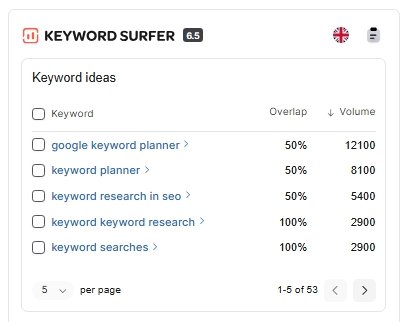
If a keyword shows “0 searches” but it makes sense for your audience, don’t dismiss it. I’ve seen pages rank and generate leads for terms that tools claimed nobody was searching for.
My clients have made money from those 0 searches.
Your knowledge and gut feeling (and awareness of upcoming trends) still matter more than any tool.
Cost: Free (Mac and Windows)
Ubersuggest – Free (with limits) but Worth the Upgrade
If you’re ready to go a little deeper, Ubersuggest is a good next step.
You can:
Research keyword ideas
Track your rankings
Analyse competitors
Monitor AI visibility
Add your own website for ongoing tracking
You get three searches per day for free. Which is enough to explore – but if you’re serious about SEO, the paid version (£29/month) is super good value and highly recommended. And no, not an affiliate link. I just think they’re the best.
Warning: once you start digging into keyword data, it’s very easy to fall down the rabbit hole!
Cost: Free for three searches a day. From £29 a month for more features.
Google Search Console – Your Most Valuable Free Keyword Research Tool
This is the tool most businesses overlook and it often gets confused with Google Analytics.
Google Analytics shows what people do on your website.
Google Search Console shows how people find your website.
It tracks:
Impressions (how often you appear in search)
Clicks
Average position for each keyword
This is powerful because it shows where you already have traction.
If a page is ranking around position 40–50, you don’t need to start from scratch. A targeted update could move it onto page one.
This is always where I start with clients – build and strengthen what’s already working before chasing new opportunities.
Cost: Free (you’ll just need access to your domain settings to connect it)
How to Choose the Right Keywords
It doesn’t need to get complicated. Rabbit hole, remember? If you delve too much, you’ll never be able to move forward. Keep this simple. Overcomplicating keyword research is one of the fastest ways to stall.
Step 1 – Identify Your Pillar Topics
What are the core subjects you talk about repeatedly?
For example, one of my pillars is SEO. But that term is far too broad.
Instead, I’d look for something more specific, like:
“How to SEO your website” – 390 searches/month
That becomes a focused content opportunity.
Each pillar topic then branches into related subtopics, all internally linked. Over time, this creates a strong content structure – that I call the spiderweb effect – which search engines love.
But different businesses will have different levels of specificity.
For example, “Spiritual hypnotherapy” (50 searches/month) could work perfectly as a service page.
Always consider search intent:
Educational search = teach, don’t sell
Commercial search = create a service or sales page
If someone searches “SEO course online”, they’re looking to buy. That belongs on a course page, not a blog.
Step 2 – Look for Easier Wins
Keyword tools will show difficulty levels based on the existing competition.
If you’re building momentum, prioritise:
– Low to medium difficulty
– Lower but relevant search volume
Quick wins build authority faster.
(That being said, I’ve seen clients reach page one for competitive terms surprisingly quickly – so treat difficulty as guidance, not a rule – who likes rules anyway?)
Step 3 – Choose One Primary Keyword Per Page
Each page should focus on one main keyword, with a few related variations.
Use the main phrase in key locations (headings, meta title and copy). Google will naturally start ranking the page for related searches too.
And sometimes, Google will show you a better keyword opportunity than the one you originally targeted. Keep an eye on this inside Search Console and Ubersuggest – it can re-shape your future content strategy.
You should now have keywords for your pillar pages (they might be your service pages or blog pages).
From that, you can start creating educational content around the questions people are asking under each of those pillars. This means going back to your research and finding new search terms.
The one big mistake people keep making: creating content that isn’t aligned with their ideal client
If your ideal client is a six-figure coach in their third year of business, and you’re offering accountancy services, you’re not writing content about how to set up QuickBooks.
They’re past that.
Instead, your content should focus on:
Managing cash flow as you scale
Paying yourself properly as a business owner
Tax planning for growing businesses
Understanding profit, not just revenue
It’s about attracting the right stage of business. Smart SEO. Not vanity SEO. Because vanity SEO that gets you clicks will actually give you a headache when you’ve got enquiries coming in from the wrong people.
FAQS
Do I really need keyword research for my website?
Yes. If you’re updating or writing website content, keyword research is essential. It helps Google understand what your pages are about and makes sure your content answers the exact questions your ideal clients are already searching for. When your content matches real searches, you attract more aligned enquiries and higher-quality leads.
Can I do keyword research for free?
Absolutely. You don’t need expensive tools to get started. Free options like Google Search Console, Keyword Surfer, and the free version of Ubersuggest can give you super valuable insights into what your audience is searching for and where your website already has visibility.
What is the best free keyword research tool?
Google Search Console is the best free tool for most businesses, followed by my favourite Ubersuggest. It shows the keywords your site already appears for, your average ranking position, impressions, and clicks. This helps you identify quick wins by improving pages that already have traction.
What does Google Search Console actually show?
Google Search Console shows how people find your website in search results, including:
Impressions (how often your site appears)
Clicks
Average position for each keyword
This data helps you optimise existing pages instead of starting from scratch.
Is Keyword Surfer accurate?
Keyword Surfer provides estimated search volumes and related keyword ideas. The numbers aren’t exact, so treat them as guidance rather than fact. If a keyword shows low or zero searches but clearly matches your audience’s needs, it can still be worth targeting. You’re the expert on your audience’s needs.
How many keywords should I target on a page?
Each page should focus on one primary keyword, supported by a few related variations. This keeps your content clear and helps search engines understand the main topic, while still allowing your page to rank for related searches.
What are pillar topics in SEO?
Pillar topics are the core subjects your business talks about regularly. Each pillar becomes a main page or key piece of content, supported by related subtopics that link back to it. This creates a strong internal linking structure – sometimes called the “spiderweb effect” – which helps build authority in search.
How do I choose the right keywords?
Start with topics relevant to your services and audience, then look for:
Search intent (educational, buying or irrelevant)
Low to medium competition if you’re building momentum
Keywords that match your ideal client’s stage of business. The goal isn’t just traffic – it’s attracting the right people.
Should I always target high-volume keywords?
Not necessarily. Lower-volume keywords with clear relevance and lower competition can bring more qualified traffic and quicker results. High-volume terms are often more competitive and less specific - but keep them on your radar as they’re absolutely something to keep in mind as part of your strategy later on.
What is search intent and why does it matter?
Search intent is the reason behind a search.
Educational searches (e.g. “how to improve SEO”) work best for blog content.
Commercial searches (e.g. “SEO consultant” or “SEO course online”) should lead to home, service or sales pages.
What’s the biggest keyword research mistake businesses make?
Creating content that isn’t aligned with their ideal client. If you want established, higher-value clients, your content should reflect their current challenges – not beginner-level problems. Otherwise, you’ll attract the wrong audience and waste time on unqualified enquiries.
How often should I review my keywords?
Regularly. I check my client’s listings weekly. Check Google Search Console and Ubersuggest to see where your pages are gaining impressions or ranking for unexpected terms. Sometimes Google identifies a better opportunity than the keyword you originally targeted.
If you want to find out how to structure a blog to be seen in Google now you’ve got your keyword in mind, check out my Page One DESIGN blog Framework. It’s just £15 and it’s my unique process I follow every time I write a blog for my clients to get them to page one of Google.